Do you have an old family photo, childhood picture, wedding image, or damaged black-and-white photo that you want to restore in HD quality? Today, AI technology can easily convert old photos into new ultra-realistic images within seconds. Learn how to use Old Photo to New Photo AI Prompt Free to restore and enhance your memories easily.
With the help of AI photo restoration tools and powerful prompts, you can remove scratches, repair damaged images, improve face quality, add realistic colors, and even transform vintage photos into modern 8K portraits.
All prompts for these images are given below in a numbered, line-by-line format.
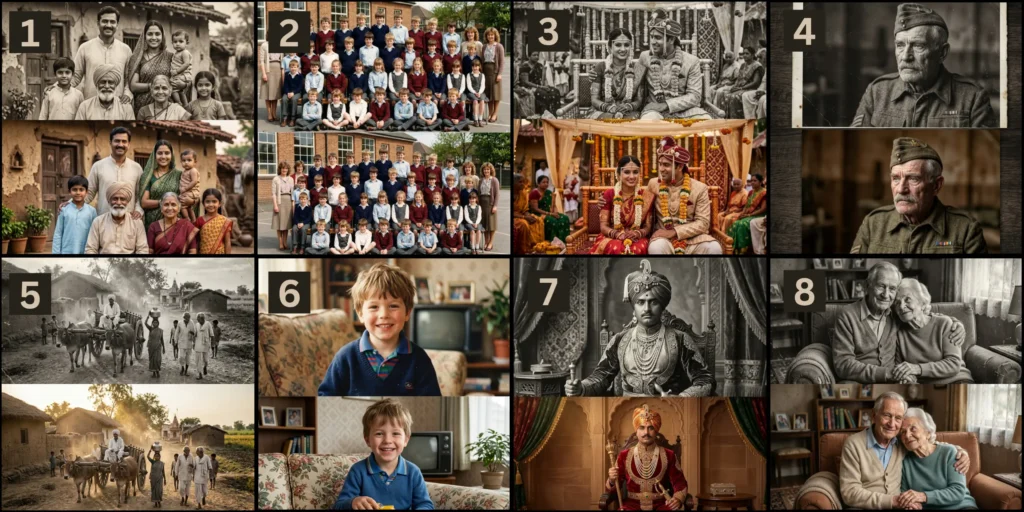
In this guide, you will learn:
- Best old photo to new photo AI prompts
- How to restore photos using ChatGPT and Gemini
- Free AI tools for photo enhancement
- Step-by-step process for beginners
- Best prompts for realistic results
8 Old Photo to New Photo AI Prompt Free
1st Image Prompt:
Restore this old Indian family photo into an ultra realistic modern 8K portrait while keeping the exact same people, same facial identity, same pose, same camera angle, same expressions, and same composition. Remove scratches, dust, faded marks, and paper damage. Enhance skin texture naturally without changing identity. Convert vintage black and white tones into realistic natural colors. Modern cinematic lighting, Canon EOS R5 photography, 85mm lens, ultra sharp focus, HDR quality, realistic fabric details, high dynamic range, professional studio-level restoration, realistic eyes and hair texture, same background recreated in high detail, masterpiece quality, ultra detailed, photorealistic
2nd Image Prompt:
Transform this old 1980s school group photo into an ultra realistic modern HD image while preserving the exact same students, same teacher faces, same positions, same uniforms, same background, and same emotions. Restore facial clarity and skin texture naturally. Remove blur, grain, scratches, and faded damage. DSLR camera realism, Sony A7R V, 8K resolution, cinematic daylight, ultra realistic eyes, natural skin tones, high detail clothing texture, professional color correction, realistic modern photography quality, same composition perfectly preserved
3rd Image Prompt:
Convert this old wedding photograph into a modern ultra realistic cinematic wedding portrait while maintaining the exact same bride and groom faces, same pose, same wedding outfit style, same jewelry placement, and same camera framing. Restore damaged details and faded textures. Add realistic skin texture, natural colors, detailed embroidery, cinematic warm lighting, Nikon Z9 camera quality, 85mm portrait lens, ultra sharp facial focus, luxury wedding photography aesthetics, HDR detail, photorealistic restoration, 8K ultra HD quality
4th Image Prompt:
Restore this old military soldier portrait into a hyper realistic modern image while preserving the exact same facial identity, same expression, same military uniform, same body angle, and same emotional atmosphere. Remove all old photo damage and faded texture. Add ultra realistic skin pores, sharp eyes, realistic beard texture, cinematic military lighting, Leica SL2 photography, 8K HDR quality, ultra detailed uniform fabric, realistic shadows, professional portrait photography look, photorealistic enhancement
5th Image Prompt:
Transform this old rural village photograph into a modern ultra detailed cinematic image while preserving the exact same villagers, same bullock cart positions, same environment, same houses, and same composition. Restore facial details and textures naturally. Remove blur and faded film damage. Add realistic sunlight, modern cinematic shadows, ultra realistic textures, RED cinema camera quality, 8K ultra HD, photorealistic atmosphere, realistic color grading, detailed environment restoration, masterpiece photography
6th Image Prompt:
Restore this old childhood portrait into an ultra realistic modern studio-quality image while preserving the exact same child face, hairstyle, smile, pose, clothing, and background composition. Remove old photo blur, scratches, and faded colors. Enhance facial detail naturally without changing identity. Canon EOS R3 camera, 85mm portrait lens, ultra realistic skin texture, soft cinematic lighting, HDR quality, realistic eyes and hair strands, professional portrait photography, 8K ultra HD restoration
7th Image Prompt:
Convert this antique royal portrait into a modern ultra luxurious realistic image while preserving the exact same royal face, same crown, same jewelry, same royal outfit, same pose, and same background style. Restore old damaged details naturally. Add realistic gold textures, detailed fabric embroidery, cinematic royal lighting, Hasselblad X2D camera quality, ultra realistic skin detail, HDR photography, museum-quality restoration, photorealistic enhancement, 8K ultra HD masterpiece
8th Image Prompt:
Restore this old elderly couple portrait into a modern ultra realistic emotional cinematic image while keeping the exact same husband and wife faces, same expressions, same sitting pose, same hand placement, and same emotional feeling. Remove all old paper damage and faded texture. Add realistic skin details, natural wrinkles, ultra realistic eyes, soft cinematic golden lighting, Sony Alpha 1 photography, 8K ultra HD quality, detailed clothing texture, photorealistic restoration, emotional storytelling portrait
Universal Prompt For Any Image:
Restore this old photo into an ultra-realistic modern 8K HD image while keeping the exact same person, same face identity, same body structure, same pose, and same composition. Do not change facial features or expression. Remove scratches, dust, blur, and any damage from the original image. Enhance details naturally with realistic skin texture, sharp eyes, and clean lighting. Convert faded or black-and-white tones into natural, realistic colors. Use cinematic DSLR photography style, shallow depth of field, HDR lighting, and ultra-detailed photorealistic quality. The final image should look like a newly captured professional portrait while preserving original identity and memory.
Also Visit : Prompt for Gemini AI Retro Style Couple Photo
How to Convert Old Photo into New HD Photo Using AI
- Step 1: Choose an AI photo restoration tool like ChatGPT, Gemini, Leonardo AI, or Remini.
- Step 2: Upload your old, blurry, damaged, or black-and-white photo.
- Step 3: Copy and paste a detailed old photo restoration AI prompt.
- Step 4: Click on the Generate or Restore button to process the image.
- Step 5: AI will automatically enhance face details, colors, and image quality.
- Step 6: Download the final restored photo in HD or 8K quality.
Best Types of Photos for AI Restoration
AI restoration works best for:
- Old family portraits
- Vintage wedding photos
- Childhood memories
- Historical pictures
- Army or military portraits
- Black-and-white photographs
- Damaged paper photos
Tips for Better AI Restored Photos
To get the best results:
- Use high-quality old photos
- Upload clear scans if possible
- Use detailed prompts
- Mention “same face” in prompts
- Add “8K quality” for sharper results
- Mention “photorealistic” for realism
Why People Use AI Photo Restoration
Many people use AI photo restoration to preserve memories and family history.
Common uses include:
- Restoring old family photos
- Enhancing childhood pictures
- Repairing torn photographs
- Converting black-and-white images into color
- Improving wedding photos
- Creating social media content
- Printing old memories in HD quality
What is Old Photo to New Photo AI?
Old Photo to New Photo AI is an AI-based image restoration process that transforms damaged, blurry, faded, or black-and-white photos into modern high-quality images.
AI tools can automatically:
- Remove scratches and dust
- Enhance face quality
- Add realistic colors
- Improve sharpness
- Increase image resolution
- Restore damaged parts of photos
These tools use machine learning and photo enhancement models to recreate details naturally.
FAQs
Can AI restore damaged old photos?
Yes, AI can repair scratches, faded textures, blur, and damaged parts of old photographs automatically.
Is there any free AI tool for old photo restoration?
Yes, tools like Remini, Fotor, ChatGPT, and Gemini offer free or limited free restoration features.
Can AI convert black-and-white photos into color?
Yes, AI colorization technology can add realistic colors to black-and-white photos.
Which AI tool is best for realistic photo restoration?
Leonardo AI, ChatGPT Images, and Remini are among the best tools for realistic results.
Can I restore old photos on mobile?
Yes, many AI restoration apps work on Android and iPhone devices.
Conclusion
Old Photo to New Photo AI technology helps users restore damaged, blurry, and black-and-white photos into modern HD or 8K quality images. With the help of AI tools like ChatGPT, Gemini, Leonardo AI, and Remini, anyone can easily enhance old memories within minutes using simple AI prompts. Whether it is a family photo, wedding picture, or childhood memory, AI restoration makes old images look fresh and realistic again.
Disclaimer
This article is for informational and educational purposes only. All AI tools, websites, and prompts mentioned belong to their respective owners. Results may vary depending on image quality, AI model, and editing settings used.